Sound Visualization Using the Elements: Part 3 – Liquid

May 26, 2009 // Posted in Audio Hardware, Culture, Visualization (Tags: , , , , , ) |  1 Comment

Ferrofluid (Magnetic Fluid)

I find ferrofluid to be fascinating.  Ferrofluid is a fluid which polarizes in the presence of a magnetic field.  This means that if you send a magnetic burst through it, you can create a visible ripple.  With steady magnetic fields, you could sculpt the liquid into any form imaginable!  As soon as the magnetic field is gone, the liquid loseWeight Exercises it’s form.

I’d imagine that it was the inspiration for Terminator 2.
“LiquidAudio was a course project for ECE362 at Purdue University. It takes in an audio signal from a standard stereo jack and outputs the average amplitude of 5 frequency bands in a pool of ferrofluid.

This video demonstrates the project to the music of “Wildcat” by Ratatat. ”

More Ferrofluid

Water

This is an excellent demonstration of Faraday waves. Faraday waves are standing waves that appear on liquids encased in a vibrating container. As the frequency of vibration changes, so does the visible pattern on the surface of the water.

Non-Newtonian Fluid
Water and corn starch on a speaker. Non-Newtonian fluid behaves as a liquid until force is exerted on it, in which case it behaves like a solid. By placing non-newtonian fluid on a subwoofer, the rapidly oscillating pressure waves cause the fluid to splash very slowly.

If you filled a pool with non-newtonian fluid, you could run across it and swim in it!

Next element: Light projected Imagery

Sound Visualization using the elements: Part 2 Fire

April 3, 2009 // Posted in Audio Hardware, Culture, Visualization (Tags: , , , , , ) |  No Comments

This is the second article in a series about methods of visualizing sound outside of a television or computer screen.

Fire

Before television screens and computer monitors, fire was what our ancestors would stare at for hours on end. It was essential for survival.

Our natural fascination with fire and music were bound to be united. Some methods are more intricate than others.

Reuben’s Tube

In this first example, the subject gives a demonstration of a Reuben’s Tube. A Reubens Tube creates visible standing waves. The waves are made visible using fire. A standing wave is a wave that remains in a constant position. It can be the result of two waves, traveling in opposite directions, intersecting with each other. In this case, two speakers facing each other in a tube create the standing waves. When music is played, the fire visibly pulses. When pure tones are played, the lengths of the waveforms are made visible.

Flamethrower

Here we see two flamethrowers mounted to a DJ booth, accentuating the climax of a musical crescendo. Who doesn’t love a big illuminating explosion when the kick drum hits?

Blowtorch

In this example, a blowtorch is used to heat the air in a glass organ. While it’s more of a woodwind instrument, I added this because fire enables the moving gasses to become visible and it’s just plain cool.Next article, Part 3 – Water

Sound Visualization using the elements: Part 1 – Electricity

April 2, 2009 // Posted in Audio Hardware, Culture, Visualization (Tags: , , , , , ) |  1 Comment

This is the first article in a series about methods of visualizing sound outside of a television or computer screen. This series was inspired by a recent discussion with Aaron Higgins of Sound Trends that got me thinking about alternative methods of music visualization.

Electricity

Electronic music has been around for nearly a hundred years. Historically, electricity has been used in conjunction with magnetism to record and reproduce sound waves.

Speakers are essentially magnetic coils, powered by electric signals. Microphones are the exact opposite. They are magnetic coils which generate electricity by being vibrated.

In this demonstration, no magnetism is used. Electrons bolting through the air at specific frequencies, recreate musical notes. In sequence, these lightning bolts are discernable as music. This is electronic music in it’s purest form.

“Say man, do you play any instruments?”
“Yeah, the tesla coil!”

In the second example, notice the neon light in the back of the room. Nikola Tesla believed that energy could be broadcast without the use of wires. This is a very good demonstration of that principle. Electricity, generated by the tesla coil is powerful enough to illuminate the nearby lightbulb.

Next article, Part 2 – Fire

Top 5 Electropella Performers

March 17, 2009 // Posted in Audio Hardware, Audio Software, Culture  |  2 Comments

What is an Electropella performance? It’s a phrase I invented to describe the act of singing accapella while sampling one’s self and playing back recorded samples to synthesize a full orchestra of voices all singing simultaniously.

1. Reggie Watts – Live on POPTUB

This video was forwarded to me by Kris of tensionstudios.net. As it turns out, I saw Reggie playing an improvised performance on an art car with a number of musicians in 2007. It rocked my world. I love that he seems to be flowing in some weird alien skat language. Check out the way he swings the microphone in front of his mouth to change the volume envelope of his voice. He also has a few moments in here that sound a lot like Prince.


2. Imogen Heap – Just For Now

Imogen Heap uses the Electrix Repeater in this stunning performance.


3. Jamie Lidell – Live at the Royal Festival

A few years ago my roommate got me tickets to see Jamie Lidell perform live. He has some of the best stage presence I’ve ever seen.

4. Kid Beyond

Kid Beyond has done a great job of popularizing the usage of samplers in vocal performance. In this video he gives a great demonstration of his process.

5. Lasse Gjertsen – Hyperactive

This video was an internet phenomenon. It seems like Lasse Gjertsen recorded the individual samples and retriggered them using midi. Hand editing this entire piece would’ve been ridiculous. Want to build your own piece like this? Check out AudioVisualizers.com for a great list of VJ software products.

Honorable Mention

Bobby McFerrin – Drive

This absolutely blew my mind. Not only does he sound like eight people singing together on his own, but he incorporates the many sounds of a car as instruments in this performance. A truly stellar accomplishment.

Creating an AdamSonic iPhone App

February 14, 2009 // Posted in Audio Hardware, General, iPhone stuff, Software  |  3 Comments

So today I created an iPhone app for my blog in less than 5 minutes.  Here’s how I did it and how you can add AdamSonic to your iPhone too!

  1. I downloaded and installed the WPtouch iPhone Theme in WordPress.  WordPress has a one click installation process that makes adding a plug-in as easy as watching a YouTube video.  The WPtouch iPhone theme will automatically detect if visitors to the blog are viewing it through an iPhone.  If they are, it automatically reformats the blog to make it much more friendly to a mobile device with a touch screen.
  2. I opened the Safari browser in the iPhone and navigated to www.adamsonic.com/blog.  As you can see from the picture, the blog formatting worked!
    BlogSonic in Safari
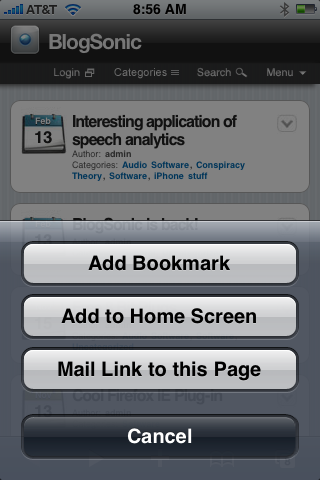
  3. I clicked on the + and added the blog to my home screen using the built in “Add to home screen” function.Add to Home Screen
    This creates an icon for the website and adds it to the home screen.BlogSonic logo
  4. Enjoy!  If you would like to use the standard web view to on your iPhone, there is an option on my blog to use that view instead.

Special thanks to Brian Geoghagan and David Battino.